How to build 6502 Second Processor Elite from the original source disc
Around the turn of the century, Ian Bell released the source code for Elite on his personal website. One of the artifacts he released was the original 1985 source disc for the 6502 Second Processor version of Elite, which took the original game and added a colour space view.
Let's take a look at the source disc and see what's involved in building 6502 Second Processor Elite from the source.
What's on the disc?
-------------------
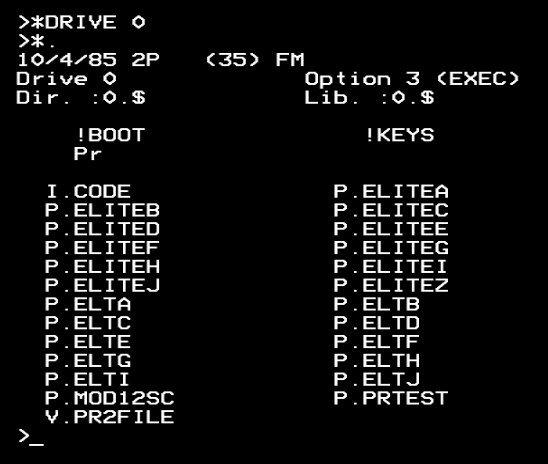
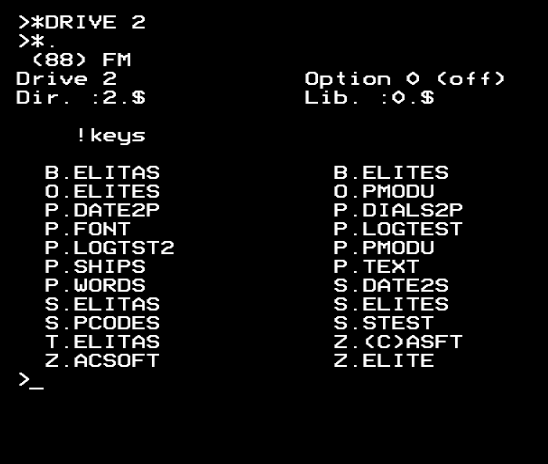
The source disc comes as a zip file, which you can download from the archive on Ian Bell's site. Inside the zip is a DSD file, which is a BBC Micro double-sided DFS disc image that consists of two sides, drive 0 and drive 2.
This is the catalogue of drive 0:
And this is drive 2:
The disc contents can be viewed on any Acorn machine with DFS, but to actually run the build it needs to be loaded into a BBC Micro with a 6502 Second Processor. It will also work on emulators: my personal favourite is Tom Seddon's b2 emulator, but any emulator with support for a second processor will do, even the browser-based JSBeeb (which you can use to run the build by following the links below).
That said, if you try to run the build process using Ian Bell's disc image, then you quickly run out of disc space. To make it easier to run the build yourself, I have produced a stripped-down version of the disc that only contains the source files that the build needs, so there's enough room to run the whole end-to-end process (though even then we still need to free up more space part-way through the build process, as space is really tight in this version).
For ultimate convenience, you can open JSBeeb with the stripped-down source disc already loaded. Then you can follow the process below to build 6502 Second Processor Elite yourself, all within your browser. If you want to follow along with your own setup, you can download the stripped-down image as a DSD file that you can load directly into your emulator.
Note that the build process needs a copy of Acorn's HIBASIC on drive 2. This is essential because it frees up more memory than standard BASIC, and we need that extra space for the build process. HIBASIC is not included in the discs from Ian Bell's site, but I have included it on the stripped-down source disc images so they are ready to go.
Also note that this build process is pretty slow. If you are in a standalone emulator you may be able to run things at a faster speed, but if you're on real hardware or JSBeeb, prepare for some long waits. It's a lot of work for an 8-bit machine to handle, and it makes you appreciate just how complicated Elite really is.
If you would like to look at the source files but don't want to be messing about with disc images from a bygone era, I have converted all the BASIC programs into text and uploaded them to the accompanying repository, where you can browse them at your convenience.
What the programs do
--------------------
Before we run through the build process itself, here's a quick summary of what the core source files do, in the order that they appear in the build pipeline. These are all BBC BASIC programs, with most of them including inline assembly language. All of them produce files as output, with some of them taking other files as input.
There are seven prerequisite files that are required by the build process: the image files P.DIALS2P, Z.ACSOFT, Z.ELITE and Z.(C)ASFT, plus C.FONT, P.SHIPS and P.WORDS. These are described in the section below on running the build, but note that C.FONT is on the source disc under the name P.FONT, so we rename it as part of the build process below.
| Program | Input | Output |
|---|---|---|
| P.PMODU | Ship source disc (download) | P.SHIPS |
| S.DATE2S | - | P.DATE2P |
| S.ELITAS | P.DATE2P P.DIALS2P Z.ACSOFT Z.ELITE Z.(C)ASFT | I.ELITEa |
| P.ELITEA | P.ELITEB P.ELITEC P.ELITED P.ELITEE P.ELITEF P.ELITEG P.ELITEH P.ELITEI P.ELITEJ | P.ELTA P.ELTB P.ELTC P.ELTD P.ELTE P.ELTF P.ELTG P.ELTH P.ELTI P.ELTJ |
| P.ELITEZ | C.FONT | I.CODE |
| S.ELITES | - | $.ELITE |
| S.PCODES | P.ELTA P.ELTB P.ELTC P.ELTD P.ELTE P.ELTF P.ELTG P.ELTH P.ELTI P.ELTJ P.SHIPS P.WORDS | P.CODE |
The following programs are also on the source disc:
- $.!KEYS contains an alternative set of function key definitions.
- $.Pr is a small utility for configuring a printer.
- B.ELITAS and T.ELITAS are alternative versions of S.ELITAS (the latter displays the build date on the loading screen).
- B.ELITES and O.ELITES are alternative versions of S.ELITES.
- O.PMODU is an alternative version of P.PMODU.
- P.LOGTEST, P.LOGTST2 and P.TEXT contain test code for the logarithm-based multiplication routines.
- P.MOD12SC is a test program for the mode 1/2 split screen.
- S.STEST is an alternative version of the loader that loads the individual ELT* binaries rather than P.CODE. It assembles to create the P.PRTEST binary.
- V.PR2FILE is a VIEW word processor document that contains information about the 6502 Second Processor version of Elite.
Now let's take a look at the build process itself.
The end result
--------------
The build process creates all the files that make up 6502 Second Processor Elite. Specifically, it creates these four binary files on drive 0:
- $.ELITE, the first game loader (which draws the Saturn)
- I.ELITEa, the second game loader (which loads the game titles and the main game code)
- I.CODE, the main game code for the I/O processor
- P.CODE, the main game code for the parasite
Once the build process has finished, you can run the game by typing *RUN $.ELITE.
Note that instead of initialising workspaces with null values like BeebAsm, the original BBC Micro source code creates its workspaces by simply incrementing the P% and O% program counters, which means that the workspaces end up containing whatever contents the allocated memory had at the time. As the source files are broken into multiple BBC BASIC programs that run each other sequentially, this means the workspaces in the source code tend to contain either fragments of these BBC BASIC source programs, or assembled code from an earlier stage.
This doesn't make any difference to the game code, which either initialises the workspaces at runtime or just ignores their initial contents, but it can mean that the binaries produced by the original build process can differ slightly from the final game's binaries when it comes to the workspace memory. For example, P.CODE starts with an uninitialised workspace, so the first few bytes are very unlikely to match the binaries in the released game.
Running the build process
-------------------------
In order to run the build process, we need all the source files, plus the seven prerequisite files mentioned above. These latter seven files are produced outside of the build process, as follows:
- P.SHIPS contains the ship data. There is a separate source disc for creating ship data, which can be found on Ian Bell's site. The sources on this separate disc create individual ship files called MISSILE, COBRA and so on, which the P.PMODU program on the 6502 Second Processor source disc combines to form the P.SHIPS file. The 6502 Second Processor source disc contains a pre-compiled P.SHIPS file, so we can just use that.
- C.FONT is the game font, and it appears on the 6502 Second Processor version source disc under the name P.FONT (we rename it as part of the build process so the P.ELITEZ program can find it). This is a direct extract of the font from the BBC Micro's operating system ROM.
- P.WORDS contains the text tokens for the game. All the other Elite source discs contain programs that generate this file, but this is missing from the 6502 Second Processor source disc. The P.WORDS file is present, though, so we can just use that.
- P.DIALS2P contains the dashboard bitmap image as a BBC Micro customised mode 2 screen image.
- Z.ACSOFT, Z.ELITE and Z.(C)ASFT contain the titles from the loading screen as BBC Micro mode 1 screen images.
These seven files are already included in the source disc from Ian Bell's site, so now let's look at the actual build process. The following assumes you are using the stripped-down disc image that frees up enough space to run the build.
First, load up your emulator and change the machine type to a BBC Micro with a 6502 Second Processor (or if you are running this on a real BBC Micro, make sure your co-processor is turned on).
Put the disc image in drive 0 and press SHIFT-CTRL-BREAK (or SHIFT-CTRL-F12 in JSBeeb). This will run a set of commands that will appear on the screen and will load the function key definitions and set the correct directory. If you are using JSBeeb, then you can simply fire it up with this link to complete this step.
Now type the following and press RETURN after each line:
  *DRIVE 2
  *RENAME P.FONT C.FONT
  CHAIN "S.DATE2S"
This will generate the P.DATE2P date image on drive 2.
Now type the following and press RETURN, and then press RETURN again at the "insert destination disk" prompt:
CHAIN "S.ELITAS"
This will generate the I.ELITEa file on drive 0.
Next, press SHIFT-CTRL-BREAK to reboot the disc (or SHIFT-CTRL-F12 in JSBeeb).
Now tap f0 (or f10 if you are in JSBeeb) and press RETURN, which will enter the following for you:
CHAIN "ELITEA"
Be careful not to hold f0 down too long, otherwise it might insert multiple copies of the CHAIN command - just tap it quickly. If it does insert too much text, you can delete it with the DELETE key and try again.
Elite will now start to build. This part takes a very long time, as it runs C.ELITEA through C.ELITEJ to produce C.ELTA through C.ELTJ. The process is then repeated to implement a two-pass assembly, and it takes a particularly long time around stage "I" and the second stage "f" - patience is the key here.
Now type the following and press RETURN, and then press RETURN again at the "insert destination disk" prompt:
CHAIN "ELITEZ"
This takes the C.FONT file and produces the I.CODE file on drive 0. It takes a while.
Now type the following and press RETURN, and then tap "Y" at each prompt:
*DESTROY P.ELITE*
This will free up enough disc space for the rest of the build process by deleting the ELITEA to ELITEZ source files, which are no longer needed.
Now type the following and press RETURN, and then press RETURN again at the "insert destination disk" prompt:
CHAIN ":2.S.ELITES"
This will generate the $.ELITE file on drive 0.
Now tap f4 and press RETURN, which will enter the following for you:
CHAIN ":2.S.PCODES"
Then press RETURN again at the "insert destination disk" prompt. This will ingest P.ELTA through P.ELTJ, P.WORDS and P.SHIPS to produce the P.CODE file on drive 0.
The build is now complete, and you can run the game by typing the following and pressing RETURN:
*RUN $.ELITE
And that is how you build 6502 Second Processor Elite on a BBC Micro, just like Bell and Braben did back in 1984/5...