The secrets of Acornsoft's self-playing demo for the BBC Micro
The Elite Demonstration Disc was released back in 1984, alongside the original BBC Micro version of Elite. This disc was sent to retailers for them to run unattended on a BBC Micro with a disc drive, and it demonstrates the cassette version of the game by self-playing the game, covering everything from buying cargo to fighting pirates.
In this article we'll take a look at exactly what the demonstration disc demonstrates, and how it does it. To see details of the code changes behind the following, see the deep dive on code changes in the Demonstration Disc.
The demonstration
-----------------
Although the demonstration disc is a floppy disc, it demonstrates the cassette version of the game. The advantage of this is that it loads the entire game into memory at once, so shops could remove the floppy disc from their display machine and simply leave it running (though any shop leaving the machine accessible would have found out the hard way that this wasn't a wise move, even with the disc removed).
Here's what the demonstration does:
- Show the iconic loading screen with the rotating Cobra Mk III and the "Load New Commander (Y/N)?" message (though you can't actually do that).
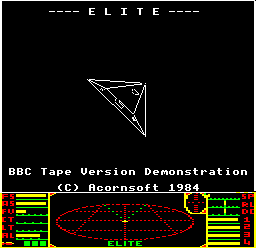
- Show the second title screen with a rotating Mamba and a message "BBC Tape Version Demonstration".
- Show the Status Mode screen for five seconds. This shows a custom commander called DISPLAY, who's docked at Lave with 2.0 light years of fuel, three missiles, 500 credits, an energy unit, and front and rear pulse lasers.
- Show the Market Price screen for five seconds.
- Show the Data on System screen for five seconds.
- Show the Equip Ship screen, buy some fuel and a missile, and wait for five seconds.
- Show the Buy Cargo screen and buy some random items of cargo.
- Show the Inventory screen for five seconds.
- Show the Long-range Chart screen, choose a random system and show the Data on System screen for five seconds, repeating this process for a random number of systems.
- Show the Status Mode screen for five seconds.
- Launch from the station.
- Show the Short-range Chart screen, move the crosshairs to Riedquat and start a hyperspace.
- Switch to the front space view to watch the hyperspace to Riedquat. From this point on, "DEMONSTRATION" will flash up as an in-flight message throughout the demo.
- Aim for the space station, using the exact same code as the docking computer from the disc version (so this will fly us towards the planet if we aren't yet inside the space station's safe zone).
- When attacked, fight back (see below for more on the combat autopilot).
- If we reach the station or (rather more likely) get destroyed by pirates, then restart the whole process from the title screen.
It's worth noting that it is almost impossible for the autopilot to reach the station, though the code is in there to dock should a miracle happen. The autopilot is simply not good enough to make it through an anarchy system with little more than a pulse laser and four missiles; even the best human pilots would find this extremely challenging, and the autopilot is a long way from being that good. I've run the demo for the equivalent of a week using fast mode in the b2 emulator, and the ship has never reached the station, so I suspect that this never happens, even though it is possible in theory.
If the ship ever did reach the space station's safe zone, then the docking computer should in theory dock with the station, though I did try this by sending the ship to the rather easier democracy of Diso, and when it reached the space station's safe zone, the docking computer seemed to work for a bit, but then decided to enter an endless pitching cycle. But if it ever did ever reach the station, then all it would do is restart the demo. That said, there is one extra bit of code that configures the authors' names to be shown on the title screen if a successful docking does occur. I suspect this was added so the authors could soak test the demo by leaving it playing for a few days, and they would then be able to tell if the ship had reached the station by looking for their names on the title screen.
Almost all keyboard input is disabled during the demonstration, though the following key presses are supported during the combat portion:
- Pause the demo by COPY, unpause it with DELETE
- Disable the sound with "Q", enable it with "S"
- Go back to the title screen and restart with ESCAPE
No other key presses have any effect, and joysticks are also disabled.
The combat autopilot
--------------------
Once the demonstration ship has jumped to Riedquat, things get a bit more interesting, as this is where the combat autopilot kicks in.
The default position in deep space is to head towards the space station, which in practice means heading towards the planet. This uses the same code as the docking computer from the enhanced versions; if you engage the docking computer in deep space in those versions then the ship will turn towards the planet, and that's exactly what happens in the demo.
This is all controlled by the DOKEY routine, which applies the docking computer to the ship's controls by calling the DOCKIT routine, just as in the normal game. See the deep dive on the docking computer for details of how the docking computer algorithm works; the only difference is that the demo version doesn't bother to check for NPC ships trying to dock, as there aren't any NPC ships in the cassette version.
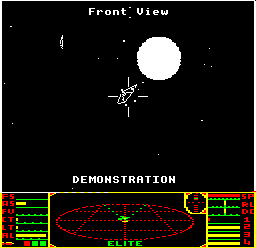
When pirates attack, things change - and because Riedquat is an anarchy system, this is very likely to happen, and pretty quickly too. The key change is when an enemy fires its lasers at us, in which case a few things happen:
- If the enemy has fired a missile at us, then part 5 of TACTICS will set the missile as our target by setting the targetShip variable to the missile's slot number.
- If the enemy has fired its lasers at us, then part 6 of TACTICS stores the attacking ship's slot number in attackingShip. If we don't already have a target, then it will set the target to the attacking ship, and will arm one of our missiles, if we have one.
- Then part 13 of the main flight loop will randomly decide (39% chance on each iteration of the main loop) whether or not to set the enemy ship as our target by setting the targetShip variable to the enemy's slot number in attackingShip.
Interestingly, attackingShip does not get reset when the attacking ship gets destroyed, so even if all the enemy ships get killed, attackingShip will still contain the slot number of the last ship to fire its lasers at us. This means the autopilot can still randomly choose to go after that ship, but because the ship doesn't exist, the autopilot just fires endlessly into the void until a new ship is spawned and stores a valid slot in attackingShip once again.
Going back to the DOKEY routine, if targetShip contains a valid slot number, then instead of heading towards the station via DOCKIT, DOKEY calls the new AttackTarget routine instead. This turns the ship towards the attacking enemy or missile using a tighter, more urgent turn than the standard docking computer.
Once the enemy target is close enough, then AttackTarget fires the ship's laser, assuming it is enabled (the laser is disabled for a short period after we fire one of our own missiles, to prevent us from accidentally shooting it down). The autopilot also refines the approach to the enemy, in the exact same way as the docking computer refines its approach when it's close to the station slot. The docking computer isn't brilliant at docking cleanly and neither is the combat autopilot; it does an awful lot of shooting, but not a great deal of careful aiming.
If we happen to get missile lock on an enemy or missile during all this kerfuffle, which might happen if the enemy has fired a missile at us and we've armed a missile, then part 11 of the main flight loop will randomly decide (61% chance on each iteration of the main loop) whether or not to fire the missile, at which point our lasers will be disabled until the main loop counter reaches 200, to prevent us accidentally shooting down our own missile.
This dance continues until either the enemies have flown into the path of our laser and perished, in which case we head for the planet once again; or, more likely, we've been taken down by pirates, in which case the whole process starts again from the title screen.
For a complete list of all the functional changes in the demonstration version, see the deep dive on code changes in the Demonstration Disc.